What this is: The day I took the mapping policy that was trained off in the lab and wired it into the live flying simulator — then watched it get stuck against walls, fixed it twice, and taught the simulator that not every room is the same size.
Why it’s here: This is the bridge moment between “the model works in a clean test harness” and “the model flies a drone around an actual room.” A lot of the interesting failures only show up when you connect the two halves, and I want to remember exactly what bit me.
Date: 2026-06-07
Ticket: v1.5c deploy (branch v2_takeoff_plus_model)
Glossary
A few terms before we dive in, in plain English:
- Deploy. Taking something that was built and tested in isolation and actually running it in the real system. Here it means: the trained decision-making model stops living in a test file and starts driving the drone inside the simulator.
- The policy (or model). The trained “brain” that decides what the drone should do next — turn, move forward, look around — based on what it currently knows about the room. Think of it as an explorer who decides each step based on the map they’ve drawn so far.
- Replay / parity check. A way to prove two systems agree. The lab recorded a step-by-step trajectory; I re-run those exact same steps inside the simulator and check that the simulator produces bit-for-bit identical readings. If they match perfectly, I know the two worlds describe physics the same way. It’s like two accountants independently adding up the same column and getting the same total to the last cent.
- Multi-world / per-world geometry. Instead of pretending every room is a fixed square, each world (an empty arena, an indoor room, etc.) carries its own real dimensions. The drone’s internal map then matches the actual walls.
- Parallel scenes. Several distinct simulated environments described in one config file, so I can point the same drone brain at an empty 6×6 arena one minute and a long indoor corridor the next.
- Live-lock (stuck-loop). A situation where the system is busy and “alive” — it keeps deciding and acting — but never actually makes progress. Like someone pushing on a “pull” door over and over. Nothing crashes; it just spins forever.
- mavros. The software bridge between the flight controller and ROS2 (the robot’s nervous system). It carries sensor readings and commands back and forth.
- SITL. Software-In-The-Loop — running the real flight-controller firmware as a program on a PC, with no physical drone, so it behaves exactly like the onboard chip would.
1. What we wanted
Two goals for the day:
- Prove the trained model and the simulator agree, then put the model in the driver’s seat. Up to now the mapping model lived in the lab’s training world. I wanted it flying a drone inside Gazebo, making real decisions, against the real safety layer.
- Stop pretending all rooms are identical. The simulator had been assuming one fixed room shape. Real worlds aren’t all the same size, and the drone’s internal map needs to match the actual walls — otherwise it maps phantom space or stops short of real corners.
2. What we did
2.1 The parity replay — a clean, perfect match
First, trust. I picked up the recorded trajectory from the lab, confirmed it was the exact file I expected (checksum matched), and replayed every recorded step inside the simulator: teleport the drone to each recorded position, regenerate every sensor reading from the simulator’s own ground-truth geometry, and replay the “moved into a new cell” bookkeeping.
The result was as good as it gets: 44 out of 44 steps matched bit-for-bit, with a maximum error of exactly zero against a tolerance that allowed for tiny floating-point drift. The internal map came out identical too. That tells me the lab’s world and the simulator’s world describe the same physics down to the last bit — so when the model behaves differently later, it’s the deployment plumbing, not a physics mismatch. I left this replay in continuous integration so it guards against future drift automatically.
2.2 Wiring the model into the ROS2 bridge
Next I built the adapter that lets the model run as a live ROS2 node. It assembles the model’s view of the world from live simulator data, advances that view at the right moments (when the drone crosses into a new cell, or takes its first look right after takeoff), and — importantly — always tells the model which actions are currently legal, so the model never wastes a decision on something physically impossible.
The node can switch between model families with a single setting. For the mapping model I run it in pure-model mode (no scripted fallback steering) so I’m honestly measuring the model and nothing else. A quick mock smoke test across ten random seeds landed comfortably inside the lab’s reference band, and a single decision took a fraction of a millisecond — fast enough that decision time is never the limiting factor.
3. Two stuck-loops — the main story of the day
This is where it got interesting. With the model in the driver’s seat, the drone got stuck in a loop twice, in two different ways. Both are the same lesson wearing two hats.
3.1 The wall freeze
The simulator lets the drone stop one cell short of a wall (a few centimetres away). But our safety layer keeps a wider buffer — about 70 cm. So there’s a “dead band” right next to a wall: the model says “move forward,” the safety layer refuses, the drone doesn’t actually move, and therefore what the model sees never changes. A model that always picks its single best action will then keep picking “move forward” forever, against a wall it can never reach. In the first run this cost roughly 2,800 wasted steps parked at a wall.
Fix: if a movement action does nothing three times in a row, temporarily mark that action as illegal in the legal-action list. The model is then forced to consider something else. This uses the model’s own built-in support for changing which actions are allowed — no hacks bolted on the side.
3.2 The corner dance
Fix one wasn’t quite enough. In a corner, freeing up the action after a single small turn (15°) just let the drone bump the wall, turn, bump, turn — a tidy little dance that also went nowhere (almost three thousand blocked attempts, five minutes wasted in one corner).
Fix v2: only re-enable a blocked action once the drone has genuinely changed cells or accumulated at least 45° of total turning — enough to be facing somewhere new. And as a final safety net: if the drone goes 30 steps without changing cells, let the model make exactly one decision in “explore a bit randomly” mode, so it escapes by following the model’s own sense of the options rather than a hardcoded nudge.
3.3 The lesson
Any layer that can refuse an action — a safety buffer, a gate, a margin — must either change what the model sees, or hide that action from the legal-action list.
If a refused action leaves the model’s view frozen and the model always picks its top choice, you get an infinite loop every time. This is worth tattooing on the wall.
4. Results — flying the empty 6×6 arena
With both fixes in, I ran the model loose in an empty 6×6 m arena. It worked, and it worked well.
| Metric | Result |
|---|---|
| Room mapped to 80% | by step 114 |
| Room mapped to 95% | by step 136 (~3 minutes of flight) |
| Final coverage | ~97.5% — effectively the whole room |
| Rotation reversals (jittery back-and-forth turning) | 0 |
| Decision time per step | a fraction of a millisecond |
The flight track showed long, deliberate sweeps across the room and a clean path around three walls. The only zig-zag in the track was the bridge layer’s wall-handling from §3 — not the model jittering. That’s the behaviour I wanted: confident, sweeping exploration rather than nervous twitching.
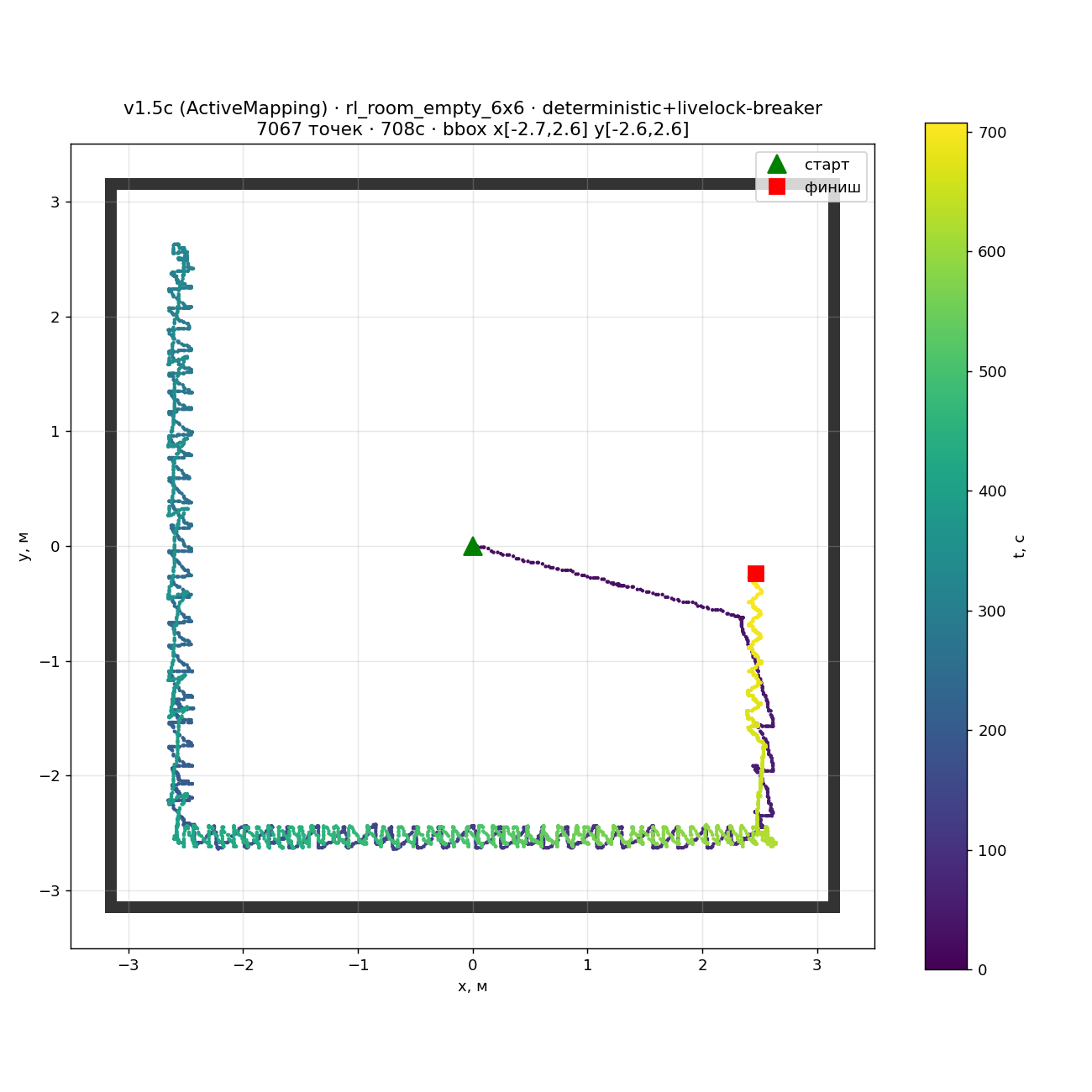
One cleanup fell out of this run: once the room was fully mapped and there was nothing left to explore, the drone had nothing sensible to do and started fidgeting. So I added a proper “mission complete” condition — once the room is mapped past the success threshold, the episode simply ends. (A note for anyone comparing numbers later: a separate “visited” coverage figure belongs to a different mission type and shouldn’t be compared head-to-head with mapping coverage.)
5. Per-world geometry — teaching the sim that rooms differ
The second half of the day: every world now declares its own real dimensions in one config file.
- The small training rooms stay 6.4 m square. The indoor room is 16×10 m — and here’s a gotcha worth flagging: my early sketch had it as 10×8, which simply didn’t match the actual world file. Measuring the real geometry caught the mistake. Any world that forgets to declare its size now fails loudly and immediately, rather than silently flying with wrong assumptions.
- Every internal map layer — the safe-flying box, coverage, the wall map, the occupancy grid — now respects the real per-axis shape of the room instead of forcing everything into a square. Importantly, the model’s own input normalisation is not stretched to fit; if it ever sees a non-standard shape it shouts a loud warning rather than quietly misbehaving.
- A small tool builds each world’s “where can I fly” mask straight from the world’s definition file, so the right map is found automatically.
And the payoff — the acceptance flight in the big indoor room passed cleanly:
| Check | Yesterday | Today |
|---|---|---|
| Forward reach (x position) | hover at ~3.7 m | flew from −6.51 m to +5.46 m |
| “Out of safe box” violations | — | 0 |
| Corridor traversal | stuck | flown end to end |
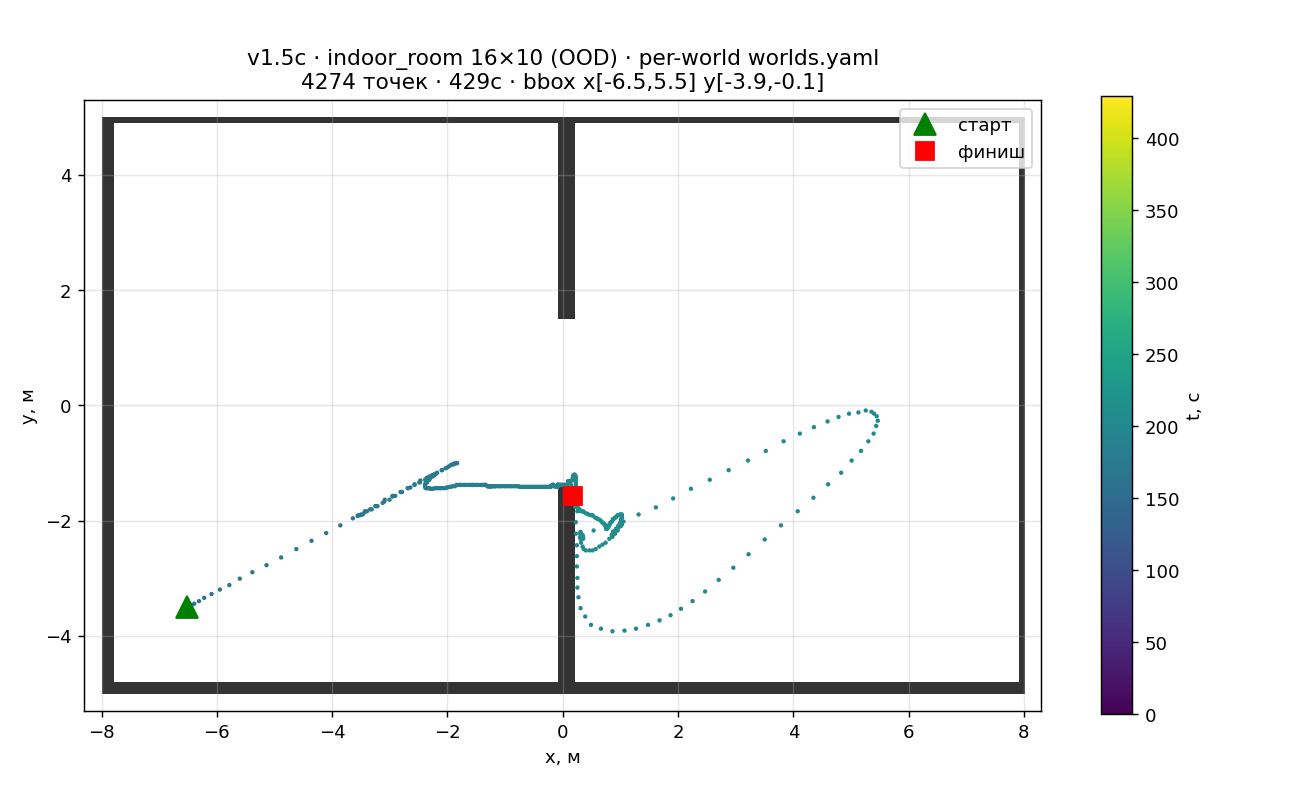
So the drone went from hovering timidly to flying the full length of a real indoor corridor without a single safety violation. That’s the moment per-world geometry earned its keep.
6. Flight-controller smoke test — verified
I also confirmed yesterday’s flight-controller fix actually stuck: the distance-sensor topic now has exactly one healthy subscriber, and the root cause from the day before (a launch file dropping its config) is closed.
While verifying, I spotted a small wiring mismatch: one bridge publishes distance-sensor data on one topic path, but mavros listens on a slightly different path — so those messages were going nowhere. It’s a one-line fix; I sent a handoff note to the firmware side and it’s queued for the next slot. Worth noting because it’s exactly the kind of “everything looks connected but isn’t” bug that hides until you check subscriber counts by hand.
7. Sources
- AM-4 parity replay gate (in CI) —
policy_bridge/test/test_parity_replay.py - ROS2 model adapter —
policy_bridge/am_adapter.py - Stuck-loop breakers v1 and v2 — bridge layer commits
- Per-world geometry —
config/worlds.yaml+world_config.py - Flight tracks —
track_v15c_empty6x6_20260607.png,track_v15c_indoor_20260607.png(with CSV alongside) - Flight videos —
sim_20260607_154253.mp4(empty 6×6, 65 s),sim_20260607_164404.mp4(indoor, 65 s) - Tooling —
track_recorder.py,track_plot.py,gen_world_free_mask.py
8. What’s next
- Fix the distance-sensor topic mismatch (§6) — a one-line firmware change.
- Investigate the indoor drift. Between spawn and “ready to take off” the drone drifted about 4 m in the indoor room. I want to watch that on the next indoor run and understand it.
- Furnished worlds. The free-space mask currently only counts wall boxes; rooms with furniture will need it to account for tables and other obstacles.
- Feed the wall-margin findings back to the lab. The mismatch between how close the training world lets the drone get to a wall versus how close the simulator’s safety layer allows is real, useful data, and it’s already in the handoff for the lab team to use.